SAP BW: Logistics (LIS) Setup Tables for Full and Delta Extraction
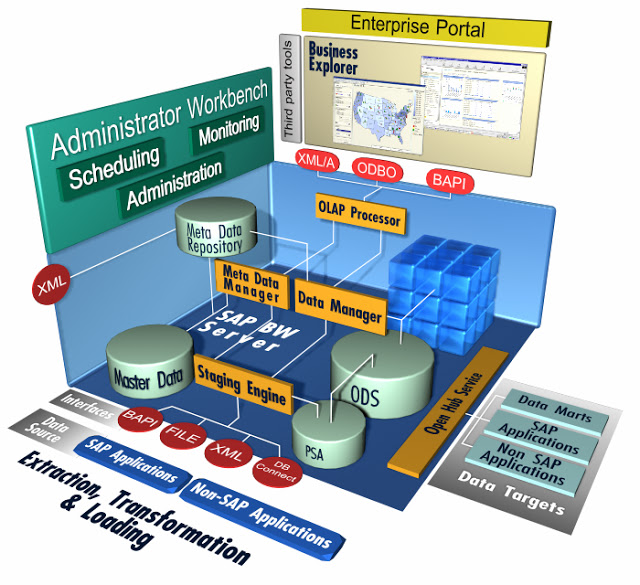
Ok, we got a disaster in SAP BW NW 7 machine, part of the physical memory just suddenly break! Yeah! and The ‘fun’ part , the malfunction occures on heavy extraction of data from SAP R3 / IS-M Production Server. It break on pararel processing , although we can identify the malfunction Object, the team didn’t want to take a risk for another Object status that runs pararel on that time.

To get a healthy SAP BW server environment , we have to restore an Offline Backup few days back, problem solved!! , but…., we just lost DELTA extraction from SAP R3 / IS-M Production Server. Doh…!!!

Now, we have to reload all the data from the beginning, and the real pain in the ass is to reload the Logistic Datasource Modul on SAP R3 /IS-M. So theese are steps to reload the Datasource:

1.Make sure the BASIS team already restored the SAP BW NW 7 system completely and flawlessly.

2.Make sure you just lost DELTA extraction from 2LIS (Logistic) Modul , if not , of course you dont’t hove to do this steps.

3.After all the prequsites met, and first thing you have to do is to DELETE the SETUP TABLES.

– Using TCODE goto SBIW screen
– Setting s For Application Specific Datasource (PI)
– Managing Extract Structure
– Using TCODE goto LBWE screen (Logistic Extraction Structure Customizing Cockpit)
– Check if the datasource active or not.
– Initialization
– DELETE Contents Of Setup tables

4.After deleting setup tables, next is to INIT (FILL) the SETUP TABLES.

– FILLING SETUP tables (Filling In The SetUp tables).
– for each Data Source

5. Done!

Virtualisasi Terbaik (Desktop)

Bekerja dengan beberapa Sistem Operasi (Operating System) (OS) menjadi tidak terhindarkan untuk saya. Dulu sih hanya sekedar untuk hobi dan iseng saja, tapi saat ini saya benar-benar menggunakannya untuk kerja.

Ini semua, gara-gara aplikasi Business Explorer (BeX) SAP 7 (NetWeaver) yang tidak mendukung Microsoft Office 2010 x64 (64 bit). Menurut SAP Notes, dukungan baru akan diberikan pada tahun 2013! waduw… keburu kiamat kali ya…

Daripada downgrade aplikasi di komputer kantor lebih baik saya menggunakan solusi Virtualisasi saja. Sebenarnya apa sih Virtualisasi itu ? Singkatnya virtualisasi itu adalah menjalankan OS lain (Client) diatas OS yang sekarang kita gunakan (Host). Tidak seperti Dual Boot dimana OS dijalankan bergantian , dipilih pada saat menjalankan komputer, Virtualisasi memungkinkan kita menjalankan beberapa Client OS pada komputer Host kita.

Beberapa aplikasi virtualisasi yang terkenal adalah WMware, Hyper-V, Virtual PC, Parrarells dan masih banyak lainnya . Beberapa sudah saya coba ‘cicipi’, dan pilihan saya jatuh pada VirtualBox yang sebenarnya ada di bawah ‘radar’ (baca:bayang-bayang) aplikasi virtualisasi yang saya sebutkan sebelumnya. Alasan utama saya memilih VirtualBox adalah karena aplikasi ini dapat menjalankan vitualisasi dengan sangat gegas pada komputer desktop dan memiliki dukungan OS yang sangat beragam (Windows,Linux,OSX,Solaris,OpenBSD).

Saya sudah menggunakan VirtualBox semenjak masih dikelola mandiri oleh para pendirinya yang berasal dari Jerman, yup! VirtualBox didirikan oleh perusahaan Jerman Innotek GmbH. Kemudian, aplikasi gratis (free) dengan sumber terbuka (opensource) ini dibeli oleh Sun Microsystems, karena Sun dibeli oleh Oracle, ya akhirnya sekarang memakai embel-embel Oracle VirtualBox. Menurut saya aplikasi ini mengalami perkembangan yang sangat mengesankan, fitur terus bertambah dan pengelolanya selalu memperbaiki bugs dengan cepat.

Beli aplikasi ERP, bangun sendiri atau sewa ISV?

Lesson Planning using Mind MapsBagi pemilik / pengelola perusahaan kelas menengah ataupun besar tentunya sangat mendambakan kehadiran sistem Enterprise Resources Planning (ERP). Entah sudah mengetahui betul ‘binatang‘ apa itu ERP atau hanya sekedar mendapat presentasi dari team marketing vendor ERP, yang jelas pemilik perusahaan menginginkan adanya suatu sistem otomatisasi proses bisnis yang dapat menampilkan data(baca:laporan) kondisi perusahaan secara cepat, akurat dan dengan dengan effort manusia yang minimal.

Pertanyaan besarnya adalah apakah saya harus membeli aplikasi ERP yang sudah jadi, membangunnya sendiri dengan team internal perusahaan, membayar jasa Independent Software Vendor (ISV) atau ada cara lainnya?

Implementasi ERP biasanya dikategorikan sebagai aktivitas besar dan masiv. Sudah pasti nominal uang dan sumber daya manusia  yang terlibat tidaklah sedikit. Tingginya resiko yang akan ditanggung perusahaan menjadikan keputusan awal model implementasi yang digunakan menjadi sangat krusial dan ‘menentukan‘.

Sekali berlayar dengan  ke arah barat, sangat pantang di tengah lautan samudra kembali lagi ke pelabuhan asal dan berlayar ke arah timur…

Rintangan dan kendala adalah sesuatu yang tidak dapat dihindarkan dalam implementasi ERP ataupun implementasi aplikasi bisnis lainnya, tetapi bila intensitas  kendala yang dihadapi terjadi berulang kali dan tiada habisnya, maka kemungkinan ada yang salah dalam pemilihan model implementasi. Berikut beberapa pilihan (opsi) membangun Sistem ERP dan kondisi penunjangnya, sehingga implementasi ERP oleh perusahaan dapat terhindar dari kegagalan total dan malapetaka.

Pilihan sengaja saya kerucutkan menjadi tiga, hal ini berdasar pengalaman dan bacaan literatur saya.

1.Membeli dan implementas  aplikasi ERP yang sudah jadi

(SAP R3, Oracle Business Suite, Microsoft Axapta/Dynamic, etc..)

Membeli aplikasi ERP (business suite) yang suda jadi seperti diatas biasanya didorong oleh kisah sukses aplikasi tersebut. Terlepas apakah kisah sukses tersebut bagian dari Marketing Campaign, biasanya aplikasi ERP jadi tersebut bisa memberi gambaran yang sangat indah, kadang terlalu indah bila cara jualan team marketingnya handal dan audiencenya tidak mendapat informasi yang cukup mengenai alternetif lain dan juga proses bisnis internal.

Implementasi yang mengandalkan aplikasi jadi  ERP semacam ini bisa sukses bila ada kondisi berikut yang mendukung :

1.Perusahaan berhasil menemukan aplikasi ERP jadi yang mencakup seluruh kebutuhan proses bisnis.
2.Perusahaan memiliki proses bisnis yang generic (umum) sehingga mudah untuk dibenchmark.
3.Perusahaan mengetahui kemampuan Divisi TI tidak begitu ‘kuat’ dalam membangun aplikasi bisnis.
4.Perusahaan tidak puas dengan sistem yang sudah ada dan dengan kemampuan pengembangannya.
5.Perusahaan tidak menemukan alternatif parsial lain yang mampu dijahit menjadi solusi menyeluruh.

2.Membangun sendiri

Sering juga disebut dengan In-House Development. Bila perusahaan memutuskan membangun aplikasi sendiri dengan hanya mengandalkan team internal sebaiknya ada kondisi pendukung berikut:

1. Manajemen mengetahui dan yakin dengan kemampuan Divisi Information Technology (IT) .
2. Divisi IT memliki sttuktur yang lengkap, ada programer, DBA, Business Analyst, Arsitek dan lainnya.
3. Mengetahui secara ‘kritis’ kemampuan dan kekurangan  aplikasi ERP yang biasa ditawarkan pihak lain.
4. Memiliki Business Proses yang matang dan sudah berlangsung lama.
5. Memiliki budaya komunikasi dan koordinasi lintas unit yang kuat dan memiliki tingkat kepercayan tinggi.

3.Menyewa, bekerjasama dengan ISV.

Bila perusahaan memutuskan membangun aplikasi dengan Independent Software Vendor (ISV) atau sering juga disebut software house, sebaiknya karena didukung oleh faktor berikut ini:

1.Manajemen mengetahui kekurangan dan kurang yakin dengan kemampuan Divisi Information Technology (IT)
2. Manajemen tidak yakin atau pernah punya pengalaman buruk dengan implementasi sistem sebelumnya.
3. Manajeman tidak dapat menemukan solusi menyeluruh/tepat pada aplikasi ERP yang sudah jadi.
4. Manajemen menyadari , peruhahaan memiliki proses bisnis yang unik.
5. Manajemen dapat menemukan beberapa pilihan ISV yang sudah terbukti handal di berbagai project.

What is the secret recepies for making a good and reliable ERP system ?

What is the secret recepies for making a good and reliable ERP system ?
and the answer is…

Centralization of Master Data

All you have to do is to have one Centralize ‘Master Data’ and the next steps, which is, how you have to build ERP system is becoming less important (critical).

Any implementation model, In-House, working with Independent Software Vendor (ISV) or make use of well known ERP application is not obstacle free, every model has it’s own challenge.

But..without single (centralize) Master Data, you are not going anywhere.

SAP BW: DTP, Extract Very Large Data from PSA to DSO

The next step in SAP BW after Initial (INIT) and Full of  Logistic (LIS) Data Extaction (with InfoPackage) from SAP R/3 to Persistance Storage Area (PSA), is to load very large data (2LIS_11_VAKON) from PSA to DataSource Object (DSO). This data source is one of the biggest Datasource we have on our SAP BW 7 system.

Seconds after we start the extraction  from PSA to DSO using Data Transfer Process (DTP), it suddenly throw an ABAP dump on first Package.

This a log file from ST22 ABAP dump Analysis:

----------------------------------------------------------------------------------------------------
Runtime Errors        UNCAUGHT_EXCEPTION
Exception             CX_SY_NO_HANDLER
----------------------------------------------------------------------------------------------------
What happened?
The exception 'CX_SY_NO_HANDLER' was raised, but it was not caught anywhere along the call hierarchy.
Since exceptions represent error situations and this error was not adequately responded to, the running ABAP program
'CL_RSBK_CMD_X=================CP' has to be terminated.
----------------------------------------------------------------------------------------------------
Error analysis
The exception, which is assigned to class 'CX_SY_NO_HANDLER', was not caught and therefore caused a runtime error.
The reason for the exception is:
An exception with the type CX_SY_OPEN_SQL_DB occurred, but was neither handled locally, nor declared in a RAISING clause.

The occurrence of the exception is closely related to the occurrence of a previous exception "CX_SY_OPEN_SQL_DB", which was raised in the program "CL_RSODSO_SEMANTIC_PACKETIZER=CP", specifically in line 79 of the (include) program "CL_RSODSO_SEMANTIC_PACKETIZER=CM002".
----------------------------------------------------------------------------------------------------
How to correct the error
If you have access to SAP Notes, carry out a search with the following keywords:

"UNCAUGHT_EXCEPTION" "CX_SY_NO_HANDLER"
"CL_RSBK_CMD_X=================CP" or "CL_RSBK_CMD_X=================CM00S"
"IF_RSBK_CMD_X~GET_DATAPACKAGE_GENERAL"

Problem Analysis:

So, after digging on search engine and SAP Notes. The problem or challenge in this ABAP dump analysis is that the process has lack of storage, lack of PSATEMP storage. PSAPTEMP is an ORACLE temporary tablespace using by the SAP BW. Like temp table on Microsoft SQL Server.

You can use ST14 to perform a Business Warehouse Application analysis, finding the large(largest) table so you can determine the suitable(minimum) size for PSAPTEMP. eventhough the exact size might be hard to figure, at least we can figure out the minimum storage size.

DTP - Semantic Groups

The process that took the significant ammount of storage is caused by ‘Semantic Groups’ technique. The ‘Semantic Groups’ feature will first gather all the information based on primary key / groups primary key to sort all the records across the packet.

Option for solution, workaround:

1.Extend  PSAPTEMP
2.Turn Off the ‘Semantic Groups’ feature in DTP. This will do the work also without extend the PSAPTEMP.
The consequence of turning off the ‘Semantic Groups’ is that you might be end up with fixing a lot of unqualified data despite those records have same key(primer key) or group key.

SAP BW: ABAP dump on Read Master Data

Read Master Data (Master Data Derivation) in SAP BW NW 7 is one of popular Transformation method to fill an InfoObject on a Cube or DSO. I think 99 percent of SAP BW architecture use this method.

Recently we have problem , an ABAP dump (error) occurs just after we finished a modification to a transformation. We are adding another read master data to new InfoObject. usually there is no any obstacle to perform this kind of modification.

The ABAB dump message (i have reduce the log file for important keyword only) :

----------------------------------------------------------------------------------------------------
Runtime Errors         GETWA_NOT_ASSIGNED
Date and Time          12.11.2010 09:53:30
----------------------------------------------------------------------------------------------------
What happened?
The current ABAP program "CL_RSDMD_LOOKUP_MASTER_DATA===CP" had to be terminated because it has come across a statement that unfortunately cannot be executed.
----------------------------------------------------------------------------------------------------
What can you do?
Using Transaction ST22 for ABAP Dump Analysis
----------------------------------------------------------------------------------------------------
Error analysis
You attempted to access an unassigned field symbol
----------------------------------------------------------------------------------------------------
How to correct the error?
If you have access to SAP Notes, carry out a search with the following keywords:
"GETWA_NOT_ASSIGNED" " "
"CL_RSDMD_LOOKUP_MASTER_DATA===CP" or "CL_RSDMD_LOOKUP_MASTER_DATA===CM003"
"PREFETCH"
----------------------------------------------------------------------------------------------------
User and Transaction
Program............. "CL_RSDMD_LOOKUP_MASTER_DATA===CP"
----------------------------------------------------------------------------------------------------
Information on where terminated
Termination occurred in the ABAP program "CL_RSDMD_LOOKUP_MASTER_DATA===CP" - in "PREFETCH".
The main program was "RSBATCH_EXECUTE_PROZESS ".
In the source code you have the termination point in line 73 of the (Include) program "CL_RSDMD_LOOKUP_MASTER_DATA===CM003".
----------------------------------------------------------------------------------------------------
Source Code Extract
63|*Get reference to prefetched data
64|data l_lines type i.
65|data l_tabix like sy-tabix.
66|read table p_th_buffer assigning  with table key iobjnm = i_iobjnm.
67|if sy-subrc = 0.
68|  IF i_reset_prefetched_data = rs_c_true.
69|    l_tabix = sy-tabix.
70|    assign -r_data->* to .
71|    describe table  lines l_lines.
72|    delete p_th_buffer index l_tabix.
|>>>>>|    clear .
74|    unassign .
75|    p_current_buffer_size = p_current_buffer_size - l_lines.
76|  ENDIF.
77|ENDIF.
----------------------------------------------------------------------------------------------------
Active Calls/Events
No: 7
Ty.Name : METHOD CL_RSDMD_LOOKUP_MASTER_DATA=>PREFETCH
Program : CL_RSDMD_LOOKUP_MASTER_DATA===CP
Include: CL_RSDMD_LOOKUP_MASTER_DATA===CM003
Line: 73

According to SAP NOTES , your system might have been implement:

SAP Note 1092539 – Master Data Lookup with prefetch

Which is a feature to speed up a read master data process by enabling “Master Data Lookup with Prefetch”. It can be turned ON by
maintaining a parameter named – MD_LOOKUP_PREFETCH_LOGIC in the table
RSADMIN. A value ‘X’ against this parameter causes the Transformation
program to switch to the new mode of Master Data look-up. It is turned ON
by default with SAP NetWeaver 7.0 BI support package 16.

Other Notes to read:

SAP Note 1175141 – Short Dump in Master Data Lookup in Transformations
SAP Note 1227788 – Reading master data with buffering returns incorrect values
SAP Note 1233535 – Reading master data with prefetch does not work correctly
SAP Note 1236970 – Reading master data returns incorrect data
SAP Note 1239269 – Error during Master Data Lookup in Transformations

Solution

1. Simply turn off the “Master Data Lookup with Prefetch” feature whic is a system-wide setting. Of course this will downgrade the ETL performace significantly
2. Update the BI patch to the latest release, or later than Release 19 . I think this is the best (recomended) option.

Good Luck

SAP BW: COPY, DELETE Query and WorkBook

sap logo

Managing Query in SAP BW NW7 can be done with theese tools and t-code:

  • Query Designer, an application from SAP NW7 Business Explorer installation.
  • t-code: RSZC : to Copy Query between InfoCube or MultiProvider
  • t-code: RSZDELETE : to Delete Quer between InfoCube or MultiProvider
  • t-code: SA38 , program: RSAQ_DELETE_QUERY : Reorganization of WorkBook and Role Storage , this t-code and program can seek query dependency with workbook. Query with workbook cannot be deleted directly, the workbook should be deleted.

Note for Deleting Query

Deleting Query can be easily done by using this t-code: RSZDELETE or using Query Designer, but sometimes problem just happen.

Problem / Symptom that migght happen when Deleting query with RSZDELETE:

The Query Cannot be deleted from Query Designer or SAP GUI (with RSZDELETE). It just keep showing error / warning message  “ Query Block” on SAP GUI interface. If we delete the Query from Query Designer, the query seems deleted but if logoff and log on BEX again the query magically appear.

So, what we have to do then? Both RSZDELETE and Query Designer cannot delete the Query.

Log on to SAP GUI > RSA1 > Transport Connection Menu.We have to set the query to the Bex Transport Request. Note that there are two kind of transport (Transport and Bex Transport). Build a new Bex Requset transport, by clicking the icon with pictures of a ‘car’ and ‘BEx’. Then Click ‘Assingn / Delete ‘, create ‘new request’ …. done!

and the query should be deleted easily. Good Luck

SAP BW, Documentation (1)

sap logoAfter getting to  know and familiar with SAP BW basic T-CODES. I found another website to help mastering SAP BW is http://sap.seo-gym.com/.

Lots of goodies relating  SAP BW, such as tutorials, learning guides and help files containing PDF or Microsoft Documents (Doc) .

Interesting, I thought the page/sub domain is a technic for Search Engine Optimation(SEO), and it works!

Theese are the list of tutorial that i copy paste from sap.seo-gym.com

  • SAP BW Authorizations docs in detail
  • SAP BW BPS Planning Folders and Layouts
  • How to integrate SAP BI with XI PDF
  • How to install SAP BW
  • SAP BW Netweaver Installation MEDIA_LIST_NETWEAVER
  • Online Analytical Processing(OLAP)
  • SAP BW Sizing Help for estimating the hardware resources needed
  • SAP BW Business Explorer(BEX) a detail learning document
  • ABAP Required in SAP BW for ABAP routines,Functional modules in detail
  • SAP BI Accelerator for high performance in queries
  • SAP BW Cell editing in BEX
  • Control and profitability Analysis in SAP BW
  • Exit Function in SAP BW
  • SAP BW Front End Designing
  • How to handle inventory in SAP BW
  • SAP BW Transaction Codes (t-codes)
  • SAP BW Performance Tuning for queries
  • SAP BW BPS WEB Based Planning

SAP BW : Cannot delete DTP

sap logoProblem:

Cannot delete Data Transfer Process (DTP) from DSO/CUBE to DSO/CUBE. Despite all the pre-conditions have been met, such as deleting data and requests in the target and source.

Error Message:

Delta DTP cannot currently be deleted (see long text)
Message no. RSBK037

Diagnosis
You want to delete a delta DTP that has been successfully used to load requests from the source into the target. If you delete the DTP, you will also delete the information on the source data that was successfully transferred. As a result the source data would be transferred again, if you create a new delta DTP that links the same source with the same target.

Procedure
You have two options:
1. Delete all the requests loaded with this DTP from the target and then delete the DTP.
2. Do not delete the DTP and continue to load deltas using this DTP.

Solution:

Go To Transaction RSBKDTP to delete DTP directly.

Source: http://forums.sdn.sap.com/thread.jspa?threadID=1568522&messageID=8581401

Additional Note:

Data Transfer Process (DTP) is related to various object such as Target, Source and Transformation. Here’s an extra table check for transformation. After deleting DTP, Cube or DSO  than the transformation should be deleted too.

RSTRAN Transformation
RSTRANFIELD Mapping of Rule Parameters – Structure Fields
RSTRANRULE Transformation Rule
RSTRANSTEPROUT Rule Type: Routine
RSTRANRULESTEP Rule Steps for a Transformation Rule
RSTRANSTEPMAP Mapping for Rule Step Within a Rule

Source:http://www.sapks.com/2010/01/dtp-tables.html