SAP BW: Logistics (LIS) Setup Tables for Full and Delta Extraction
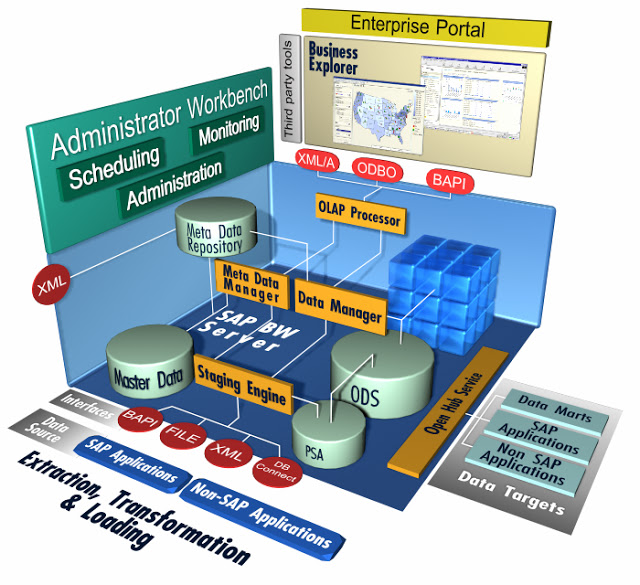
Ok, we got a disaster in SAP BW NW 7 machine, part of the physical memory just suddenly break! Yeah! and The ‘fun’ part , the malfunction occures on heavy extraction of data from SAP R3 / IS-M Production Server. It break on pararel processing , although we can identify the malfunction Object, the team didn’t want to take a risk for another Object status that runs pararel on that time.

To get a healthy SAP BW server environment , we have to restore an Offline Backup few days back, problem solved!! , but…., we just lost DELTA extraction from SAP R3 / IS-M Production Server. Doh…!!!

Now, we have to reload all the data from the beginning, and the real pain in the ass is to reload the Logistic Datasource Modul on SAP R3 /IS-M. So theese are steps to reload the Datasource:

1.Make sure the BASIS team already restored the SAP BW NW 7 system completely and flawlessly.

2.Make sure you just lost DELTA extraction from 2LIS (Logistic) Modul , if not , of course you dont’t hove to do this steps.

3.After all the prequsites met, and first thing you have to do is to DELETE the SETUP TABLES.

– Using TCODE goto SBIW screen
– Setting s For Application Specific Datasource (PI)
– Managing Extract Structure
– Using TCODE goto LBWE screen (Logistic Extraction Structure Customizing Cockpit)
– Check if the datasource active or not.
– Initialization
– DELETE Contents Of Setup tables

4.After deleting setup tables, next is to INIT (FILL) the SETUP TABLES.

– FILLING SETUP tables (Filling In The SetUp tables).
– for each Data Source

5. Done!

Microsoft Analysis Service (OLAP) Front-End

Visual Business Intelligence - Tables and Graphs 1

Option for MSSQL Analysis Service (OLAP) Front-End

1.Microsoft SQL Reporting Service

SQL Server Reporting Services (SSRS) is a server-based report generation software system from Microsoft. It can be used to prepare and deliver a variety of interactive and printed reports. It is administered via a web interface

2.Microsoft PerformancePoint Service

PerformancePoint Services in Microsoft SharePoint Server 2010 is a performance management service that you can use to monitor and analyze your business. By providing flexible, easy-to-use tools for building dashboards, scorecards, reports, and key performance indicators (KPIs), PerformancePoint Services can help everyone across an organization make informed business decisions that align with companywide objectives and strategy. Scorecards, dashboards, and KPIs help drive accountability. Integrated analytics help employees move quickly from monitoring information to analyzing it and, when appropriate, sharing it throughout the organization.

3.Tantalum

4.Analyzer

Analyzer allows even non-technical users to become productive and self-sufficient quickly, performing powerful analysis and building visually compelling dashboards and flexible reports. A wide variety of components, including pivot tables, charts, Key Performance Indicator (KPI) scorecards, dashboards, web pages, Reporting Services® reports, geographic maps, heat maps, and more — lets users create custom reports and dashboards just by dragging and dropping.

5.Visifire

Visifire is a set of data visualization controls – powered by Microsoft®Silverlight & WPF. Visifire is a multi-targeting control which can be used in both WPF & Silverlight applications. Use the same API to create charts & gauges in Mobile, Web & Desktop environments. Visifire Silverlight Controls can also be embedded in any webpage as a standalone Silverlight App. Don’t take our word for it! Visit Visifire Gallery or design your own chart or gauge using Chart/Gauge Designer.

6.XlCubed

XLCubed’s product set empowers the business user. Bringing the power and flexibility of OLAP reporting to Excel, XLCubed leverages Excel’s strengths but mitigates the risks. Users have a rich Reporting, Analytics and Dashboard environment in Excel, and the ability to deploy the reports to XLCubed Web Edition with ease

7.Tableau

Flat files, databases, warehouses, or cubes: Access your data wherever it lives. Analyze it. Fast.The reality of business today is that no organization has data in a single place. Heterogeneous environments are the rule; exceptions to it are hard to find. You need the ability to analyze data wherever it lives to get the answers you need. Make sure your business intelligence solution can handle your data, everywhere.

8.Report Portal

Report Portal is an advanced web client reporting solution that lets you build, publish and view the following types of reports

9.ranet-uilibrary-olap

It provides parsing, generating and visualization of MDX language and MDX query results. Moreover it provides data input and Writeback to OLAP cube. It works under .NET and Silverlight.

10. DevExpress  –  Business Intelligence Suite

DevExpress Analytics controls allow you to deliver highly interactive data-centric applications to your end-users with minimal effort. From OLAP data mining with integrated charting to data export and analysis via our award winning gauge and reporting options, DevExpress allows you to deliver your very best and offer your customers a way in which to intuitively analyze data.

11. Viblend

VIBlend DataGridView for WinForms is a top of the line data grid control loaded with hundreds of powerful features. It provides a solid and highly extensive data visualization foundation ideal for a broad spectrum of data driven applications. You can build in-house Business Intelligence applications as easily as loading a set of records from a database.

12.Syncfusion – ASP.NET – For BI Edition

We offer more than 60 AJAX-enabled controls/frameworks with complete documentation and samples for the ASP.NET platform. Our unique wrappers for jQuery UI controls allow you to easily add advanced jQuery UI features to your Web Forms applications.

anything else..??

SSAS: MDX Average Script On SSAS 2008

The MDX script on Microsoft Analysis Service (SSAS) 2008 and 2005 are different from SQL 2000. Here’s an example how to calculate average using MDX script on Analysis Service 2008.

SSAS 2008, How to calculate Net Value By Date (NetValue / Date)

AVG(
Descendants(
[Time].[Calendar].CurrentMember,
[Time].[Calendar].[Date]
),
[Measures].[NetValue]
)

Old one, SSAS 2000, How to calculate Net Value By Date (NetValue / Date)

AVG(
Descendants(
[Time].CurrentMember, [Date]
),
[Measures].[NetValue]
)

Other source from MSDN
http://msdn.microsoft.com/en-us/library/ms146067.aspx

What is the secret recepies for making a good and reliable ERP system ?

What is the secret recepies for making a good and reliable ERP system ?
and the answer is…

Centralization of Master Data

All you have to do is to have one Centralize ‘Master Data’ and the next steps, which is, how you have to build ERP system is becoming less important (critical).

Any implementation model, In-House, working with Independent Software Vendor (ISV) or make use of well known ERP application is not obstacle free, every model has it’s own challenge.

But..without single (centralize) Master Data, you are not going anywhere.

SAP BW: DTP, Extract Very Large Data from PSA to DSO

The next step in SAP BW after Initial (INIT) and Full of  Logistic (LIS) Data Extaction (with InfoPackage) from SAP R/3 to Persistance Storage Area (PSA), is to load very large data (2LIS_11_VAKON) from PSA to DataSource Object (DSO). This data source is one of the biggest Datasource we have on our SAP BW 7 system.

Seconds after we start the extraction  from PSA to DSO using Data Transfer Process (DTP), it suddenly throw an ABAP dump on first Package.

This a log file from ST22 ABAP dump Analysis:

----------------------------------------------------------------------------------------------------
Runtime Errors        UNCAUGHT_EXCEPTION
Exception             CX_SY_NO_HANDLER
----------------------------------------------------------------------------------------------------
What happened?
The exception 'CX_SY_NO_HANDLER' was raised, but it was not caught anywhere along the call hierarchy.
Since exceptions represent error situations and this error was not adequately responded to, the running ABAP program
'CL_RSBK_CMD_X=================CP' has to be terminated.
----------------------------------------------------------------------------------------------------
Error analysis
The exception, which is assigned to class 'CX_SY_NO_HANDLER', was not caught and therefore caused a runtime error.
The reason for the exception is:
An exception with the type CX_SY_OPEN_SQL_DB occurred, but was neither handled locally, nor declared in a RAISING clause.

The occurrence of the exception is closely related to the occurrence of a previous exception "CX_SY_OPEN_SQL_DB", which was raised in the program "CL_RSODSO_SEMANTIC_PACKETIZER=CP", specifically in line 79 of the (include) program "CL_RSODSO_SEMANTIC_PACKETIZER=CM002".
----------------------------------------------------------------------------------------------------
How to correct the error
If you have access to SAP Notes, carry out a search with the following keywords:

"UNCAUGHT_EXCEPTION" "CX_SY_NO_HANDLER"
"CL_RSBK_CMD_X=================CP" or "CL_RSBK_CMD_X=================CM00S"
"IF_RSBK_CMD_X~GET_DATAPACKAGE_GENERAL"

Problem Analysis:

So, after digging on search engine and SAP Notes. The problem or challenge in this ABAP dump analysis is that the process has lack of storage, lack of PSATEMP storage. PSAPTEMP is an ORACLE temporary tablespace using by the SAP BW. Like temp table on Microsoft SQL Server.

You can use ST14 to perform a Business Warehouse Application analysis, finding the large(largest) table so you can determine the suitable(minimum) size for PSAPTEMP. eventhough the exact size might be hard to figure, at least we can figure out the minimum storage size.

DTP - Semantic Groups

The process that took the significant ammount of storage is caused by ‘Semantic Groups’ technique. The ‘Semantic Groups’ feature will first gather all the information based on primary key / groups primary key to sort all the records across the packet.

Option for solution, workaround:

1.Extend  PSAPTEMP
2.Turn Off the ‘Semantic Groups’ feature in DTP. This will do the work also without extend the PSAPTEMP.
The consequence of turning off the ‘Semantic Groups’ is that you might be end up with fixing a lot of unqualified data despite those records have same key(primer key) or group key.

SAP BW: ABAP dump on Read Master Data

Read Master Data (Master Data Derivation) in SAP BW NW 7 is one of popular Transformation method to fill an InfoObject on a Cube or DSO. I think 99 percent of SAP BW architecture use this method.

Recently we have problem , an ABAP dump (error) occurs just after we finished a modification to a transformation. We are adding another read master data to new InfoObject. usually there is no any obstacle to perform this kind of modification.

The ABAB dump message (i have reduce the log file for important keyword only) :

----------------------------------------------------------------------------------------------------
Runtime Errors         GETWA_NOT_ASSIGNED
Date and Time          12.11.2010 09:53:30
----------------------------------------------------------------------------------------------------
What happened?
The current ABAP program "CL_RSDMD_LOOKUP_MASTER_DATA===CP" had to be terminated because it has come across a statement that unfortunately cannot be executed.
----------------------------------------------------------------------------------------------------
What can you do?
Using Transaction ST22 for ABAP Dump Analysis
----------------------------------------------------------------------------------------------------
Error analysis
You attempted to access an unassigned field symbol
----------------------------------------------------------------------------------------------------
How to correct the error?
If you have access to SAP Notes, carry out a search with the following keywords:
"GETWA_NOT_ASSIGNED" " "
"CL_RSDMD_LOOKUP_MASTER_DATA===CP" or "CL_RSDMD_LOOKUP_MASTER_DATA===CM003"
"PREFETCH"
----------------------------------------------------------------------------------------------------
User and Transaction
Program............. "CL_RSDMD_LOOKUP_MASTER_DATA===CP"
----------------------------------------------------------------------------------------------------
Information on where terminated
Termination occurred in the ABAP program "CL_RSDMD_LOOKUP_MASTER_DATA===CP" - in "PREFETCH".
The main program was "RSBATCH_EXECUTE_PROZESS ".
In the source code you have the termination point in line 73 of the (Include) program "CL_RSDMD_LOOKUP_MASTER_DATA===CM003".
----------------------------------------------------------------------------------------------------
Source Code Extract
63|*Get reference to prefetched data
64|data l_lines type i.
65|data l_tabix like sy-tabix.
66|read table p_th_buffer assigning  with table key iobjnm = i_iobjnm.
67|if sy-subrc = 0.
68|  IF i_reset_prefetched_data = rs_c_true.
69|    l_tabix = sy-tabix.
70|    assign -r_data->* to .
71|    describe table  lines l_lines.
72|    delete p_th_buffer index l_tabix.
|>>>>>|    clear .
74|    unassign .
75|    p_current_buffer_size = p_current_buffer_size - l_lines.
76|  ENDIF.
77|ENDIF.
----------------------------------------------------------------------------------------------------
Active Calls/Events
No: 7
Ty.Name : METHOD CL_RSDMD_LOOKUP_MASTER_DATA=>PREFETCH
Program : CL_RSDMD_LOOKUP_MASTER_DATA===CP
Include: CL_RSDMD_LOOKUP_MASTER_DATA===CM003
Line: 73

According to SAP NOTES , your system might have been implement:

SAP Note 1092539 – Master Data Lookup with prefetch

Which is a feature to speed up a read master data process by enabling “Master Data Lookup with Prefetch”. It can be turned ON by
maintaining a parameter named – MD_LOOKUP_PREFETCH_LOGIC in the table
RSADMIN. A value ‘X’ against this parameter causes the Transformation
program to switch to the new mode of Master Data look-up. It is turned ON
by default with SAP NetWeaver 7.0 BI support package 16.

Other Notes to read:

SAP Note 1175141 – Short Dump in Master Data Lookup in Transformations
SAP Note 1227788 – Reading master data with buffering returns incorrect values
SAP Note 1233535 – Reading master data with prefetch does not work correctly
SAP Note 1236970 – Reading master data returns incorrect data
SAP Note 1239269 – Error during Master Data Lookup in Transformations

Solution

1. Simply turn off the “Master Data Lookup with Prefetch” feature whic is a system-wide setting. Of course this will downgrade the ETL performace significantly
2. Update the BI patch to the latest release, or later than Release 19 . I think this is the best (recomended) option.

Good Luck

SAP BW: COPY, DELETE Query and WorkBook

sap logo

Managing Query in SAP BW NW7 can be done with theese tools and t-code:

  • Query Designer, an application from SAP NW7 Business Explorer installation.
  • t-code: RSZC : to Copy Query between InfoCube or MultiProvider
  • t-code: RSZDELETE : to Delete Quer between InfoCube or MultiProvider
  • t-code: SA38 , program: RSAQ_DELETE_QUERY : Reorganization of WorkBook and Role Storage , this t-code and program can seek query dependency with workbook. Query with workbook cannot be deleted directly, the workbook should be deleted.

Note for Deleting Query

Deleting Query can be easily done by using this t-code: RSZDELETE or using Query Designer, but sometimes problem just happen.

Problem / Symptom that migght happen when Deleting query with RSZDELETE:

The Query Cannot be deleted from Query Designer or SAP GUI (with RSZDELETE). It just keep showing error / warning message  “ Query Block” on SAP GUI interface. If we delete the Query from Query Designer, the query seems deleted but if logoff and log on BEX again the query magically appear.

So, what we have to do then? Both RSZDELETE and Query Designer cannot delete the Query.

Log on to SAP GUI > RSA1 > Transport Connection Menu.We have to set the query to the Bex Transport Request. Note that there are two kind of transport (Transport and Bex Transport). Build a new Bex Requset transport, by clicking the icon with pictures of a ‘car’ and ‘BEx’. Then Click ‘Assingn / Delete ‘, create ‘new request’ …. done!

and the query should be deleted easily. Good Luck

SAP BW, Documentation (1)

sap logoAfter getting to  know and familiar with SAP BW basic T-CODES. I found another website to help mastering SAP BW is http://sap.seo-gym.com/.

Lots of goodies relating  SAP BW, such as tutorials, learning guides and help files containing PDF or Microsoft Documents (Doc) .

Interesting, I thought the page/sub domain is a technic for Search Engine Optimation(SEO), and it works!

Theese are the list of tutorial that i copy paste from sap.seo-gym.com

  • SAP BW Authorizations docs in detail
  • SAP BW BPS Planning Folders and Layouts
  • How to integrate SAP BI with XI PDF
  • How to install SAP BW
  • SAP BW Netweaver Installation MEDIA_LIST_NETWEAVER
  • Online Analytical Processing(OLAP)
  • SAP BW Sizing Help for estimating the hardware resources needed
  • SAP BW Business Explorer(BEX) a detail learning document
  • ABAP Required in SAP BW for ABAP routines,Functional modules in detail
  • SAP BI Accelerator for high performance in queries
  • SAP BW Cell editing in BEX
  • Control and profitability Analysis in SAP BW
  • Exit Function in SAP BW
  • SAP BW Front End Designing
  • How to handle inventory in SAP BW
  • SAP BW Transaction Codes (t-codes)
  • SAP BW Performance Tuning for queries
  • SAP BW BPS WEB Based Planning

SAP BW : Cannot delete DTP

sap logoProblem:

Cannot delete Data Transfer Process (DTP) from DSO/CUBE to DSO/CUBE. Despite all the pre-conditions have been met, such as deleting data and requests in the target and source.

Error Message:

Delta DTP cannot currently be deleted (see long text)
Message no. RSBK037

Diagnosis
You want to delete a delta DTP that has been successfully used to load requests from the source into the target. If you delete the DTP, you will also delete the information on the source data that was successfully transferred. As a result the source data would be transferred again, if you create a new delta DTP that links the same source with the same target.

Procedure
You have two options:
1. Delete all the requests loaded with this DTP from the target and then delete the DTP.
2. Do not delete the DTP and continue to load deltas using this DTP.

Solution:

Go To Transaction RSBKDTP to delete DTP directly.

Source: http://forums.sdn.sap.com/thread.jspa?threadID=1568522&messageID=8581401

Additional Note:

Data Transfer Process (DTP) is related to various object such as Target, Source and Transformation. Here’s an extra table check for transformation. After deleting DTP, Cube or DSO  than the transformation should be deleted too.

RSTRAN Transformation
RSTRANFIELD Mapping of Rule Parameters – Structure Fields
RSTRANRULE Transformation Rule
RSTRANSTEPROUT Rule Type: Routine
RSTRANRULESTEP Rule Steps for a Transformation Rule
RSTRANSTEPMAP Mapping for Rule Step Within a Rule

Source:http://www.sapks.com/2010/01/dtp-tables.html